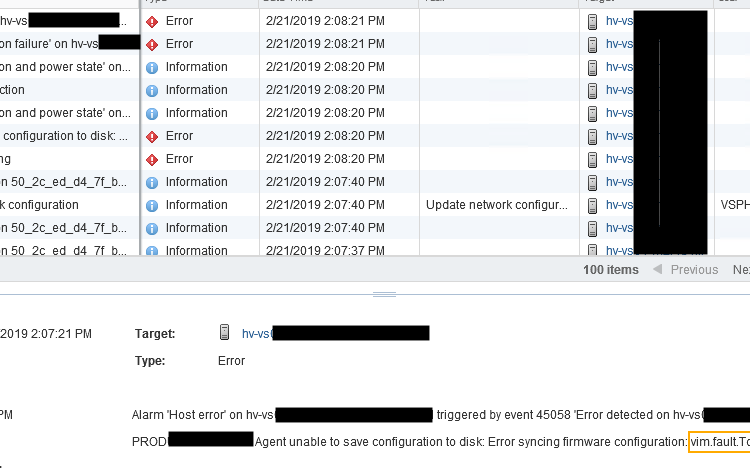
During a deployment of several ESXi hosts at a customer, I noticed that the new hosts were disconnecting every few minutes. When I checked the event error, it showed a lot of different errors and events, mostly about disconnection errors and connection failures. Which I found weird. Looking closer, the error message reads: “agent unable …read more →

Intro Without knowledge, one cannot make reliable (technical) decisions. Quite simple right. That’s why it is so important that you do your research well and spend enough time gathering information about the current environment. It makes the previous phases invaluable, and it shall act as your foundation for the upcoming phases. At this stage, you …read more →
Intro You have done the interviews, gained a lot of insight through tools, documentation and whatsoever, and with that you’ve created your first draft of the so-called IST. During the assessment phase you’ve also learned how the environment is being used, what the applications landscape looks like, what kind of hardware and underlying infrastructure is …read more →

Intro With the GAP-Analysis we’ll try to create a clear overview of where we start and where we want to be, starting with defining the IST. The IST is so called starting point or baseline if you will. It describes and evaluate the current state of the environment and it is key for a project …read more →

Intro One of the most important parts in projects (and also most of the time neglected) is the assessment phase. Creating an upgrade path and executing it, is no different. Some upgrade paths are easy and can be done in a few days or even hours. Others however, can take months, or even up to …read more →

IntroThis is the beginning of the blogpost series “Creating a Roadmap for vSphere Upgrades”. As a consultant, I’ve seen quite some different type of customers, business environments, uses cases for using virtualization and different kind of setups and implementations. One of my recent projects that I’ve been placed on, was upgrading a vSphere environment, but …read more →

I recently had a problem that one of my vCenters (vCSA 6.5) was constantly logging off any kind of user after a few minutes. Which would end up with the following error output: “Your vsphere Client session is no longer authenticated Please login again”. This even happend after 2 minutes whenever I was logged in. …read more →
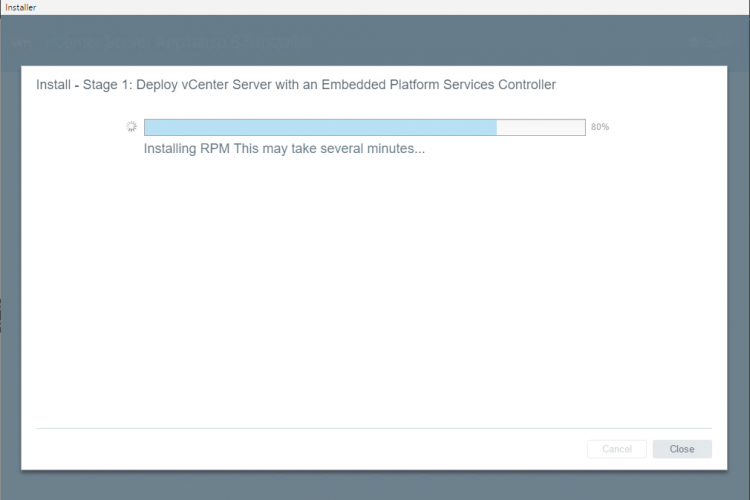
if you came across this post then you’ll probably had the problem that the vCenter installation became stuck around the 80%, with the text “Installing RPM This may take several minutes…”. Unfortunately, this doesn’t take minutes but several hours until it figures out that it got an issue and it just stops. Like this screen: …read more →
It is Saturday morning 08:00. Sleep status = Zero. Only one day before I’m taking the plane to VMworld Barcelona. This is the first time that I’m attending, and I’ve been looking forward to this event for a very long time, which make me feel very blessed that I get this opportunity from my company …read more →

Install Android 8.1 on VMware Fusion Tested on macOS High Sierra & VMware Fusion 10.1.2 So it started when I had to bring my phone back for repairs. I didn’t had any android phone, and some apps that I actually needed, where not available on any other OS. So I decided to virtualize the Android …read more →